Microsoft’s aggressive push towards integrating AI into Windows came with a small hardware addition as well, the Neural Processing Unit or NPU. If you’ve looked for a new laptop lately and wondered what TOPS is, it’s the measure of the built-in NPU’s performance.
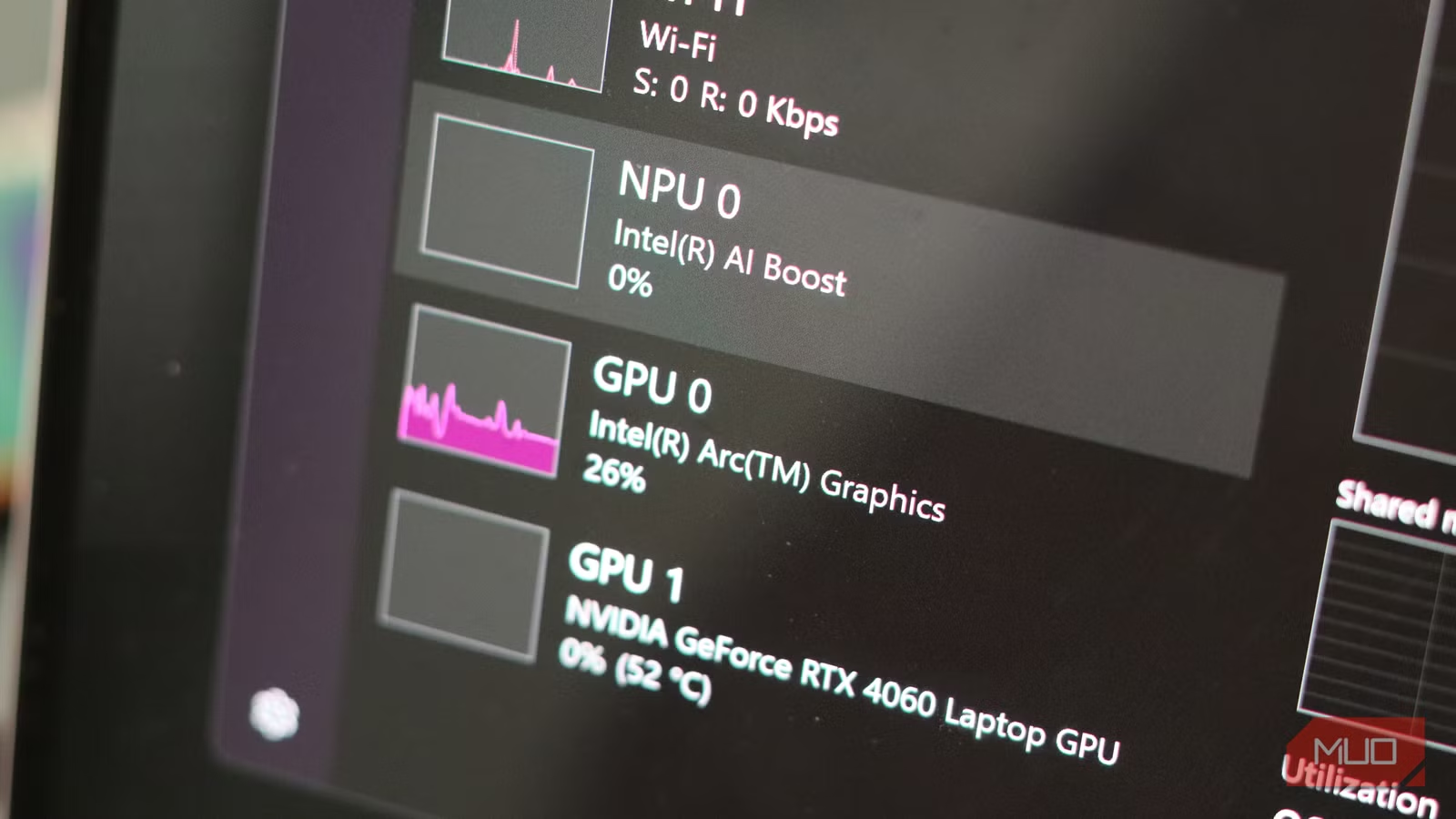
Microsoft wants you to believe you should buy a PC with an NPU at least 40 TOPS strong, so you can use all their flashy AI features. Well, I bought one, and two years later, it’s still sitting unused in my laptop.
Microsoft sold me an AI future, but this isn’t it
Copilot+, NPUs, and the promise of AI PCs
On paper, the pitch is actually quite compelling. Microsoft and its hardware partners claimed that with an NPU, your laptop becomes a private local AI machine, running LLMs, transcribing speech, applying real-time video effects, and more, all without sending your data to the cloud for processing.
The big promise was on-device intelligence made accessible and efficient by the NPU. The NPU crunches AI workloads while the CPU and GPU stay free. It extends battery life and frees up CPU and GPU resources for other applications you might need them for.
Recall was the flagship Windows feature that was supposed to use the NPU, letting you search through your desktop activity using natural language. Other Copilot+ tricks like semantic file search, live captions with real-time translations, webcam background blur and eye-contact correction, and even AI-powered image tweaks in the Photos app made for a solid pitch for wanting an NPU in your next laptop.
The NPU push has been a coordinated effort between Microsoft, Intel, AMD, Qualcomm, and other major OEMs. Microsoft needed hardware to go up against Apple’s M-series chips, which have integrated neural engines for years and use them effectively. Intel and AMD needed a differentiator beyond raw CPU clock speeds, and Qualcomm needed the Snapdragon X series to look like more than just an ARM laptop chip.
The result was a marketing blitz that defined AI PCs as more than just a spec bump. It was a whole new way of using a PC, or at least that was the dream Microsoft sold.
Here’s what having an NPU actually feels like
Most of the time, it just sits there
Intel debuted NPUs in consumer laptops with its Meteor Lake line of processors in 2024. Since then, local LLMs have come a long way and are great at certain tasks, but most popular apps, such as LM Studio or Ollama, still default to the GPU or CPU. The NPU simply sits there, idle.
Recall, the supposed crown jewel for the NPU, became a PR disaster almost immediately after launch. Apart from being the privacy nightmare that Recall was, it faced repeated delays and controversies. To make matters worse, researchers figured out ways to enable the feature on older hardware without an NPU through unofficial workarounds.
The rest of the Copilot+ experience was more functional, but modest at best. Windows Studio Effects—the webcam background blur and eye-contact correction—work, but your mileage may vary. Live Captions with real-time translation can be genuinely useful. And semantic search makes finding files less painful, although you’d be much better off replacing Windows Search with the Command Palette.

- OS
-
Windows, macOS, Linux
- Developer
-
Element Labs
- Price model
-
Free
A free desktop app that lets you download, run, and chat with large language models locally, no cloud required.
The real problem isn’t the hardware, it’s the software
Developers aren’t building for it (yet)
An NPU only helps when programs are explicitly written to offload workloads to it. Anything from tools to run local LLMs to creative software, almost no one is using built-in NPUs on Windows machines for AI workloads. The specialized chip architecture means developers have to write code specifically targeting the NPU. It’s not something apps can fall back on automatically.
Intel itself acknowledged during technical sessions at CES 2024 that on Meteor Lake, the most demanding AI workloads are still offloaded to the integrated Arc GPU. The NPU is meant for handling continuous, low-intensity tasks like background blur. Digital Trends tested the power difference between running background blur on the GPU versus the NPU and found an almost negligible gap, with the GPU averaging 18.9 W and the NPU coming in at 17.6W over 30 minutes—not exactly the significant efficiency gain marketing implied.
Microsoft has since tried to minimize the damage. It launched Windows ML, a framework that lets developers write AI apps targeting CPUs, GPUs, and NPUs, rather than the NPU exclusively.
Is the NPU entirely useless?
The few features that actually benefit

The NPU in your laptop isn’t zero value. If you’re constantly on video calls throughout the day, the on-device Studio effects can help. As mentioned before, live captions and semantic search are also useful features, but other software-based solutions don’t require you to pay a premium price tag when buying a laptop. So, if any of these use cases entice you, the NPU has some basic use.
There’s also a plausible future-proofing argument here. Software ecosystems tend to catch up with hardware eventually. As tooling improves and more models are quantized and tuned for NPUs, that idle silicon might eventually start seeing some use.
The problem, however, is timing. Yes, software might eventually start using the NPU, but eventually isn’t what I paid for. I’ve had my HP Omen Transcend 14 for almost two years now, and the NPU has barely seen any use.
Don’t buy a laptop for the NPU
It’s nice to have, but not worth a price jump just yet
If you already own an NPU-equipped laptop, you don’t need to regret it outright. Treat the NPU as an overpowered background blur engine, which might just be a useful AI accelerator tomorrow. Keep an eye out for how local AI tooling evolves, because there’s a good chance it eventually starts using the NPU.

4 Reasons I Simply Don’t Care About AI PCs
Big tech companies have hyped AI PCs as the next big thing, but I won’t splurge on one anytime soon.
If you’re about to buy a laptop and the marketing gets too flashy, remember that the hefty price jump on the basis of a dedicated NPU is you paying for an expensive block of silicon that’s doing almost nothing at the moment. It might in the future, but until then, you’ll be paying for a feature that hasn’t arrived yet. In theory, your laptop has a dedicated brain for an AI; in practice, it’s just an expensive background blur button.