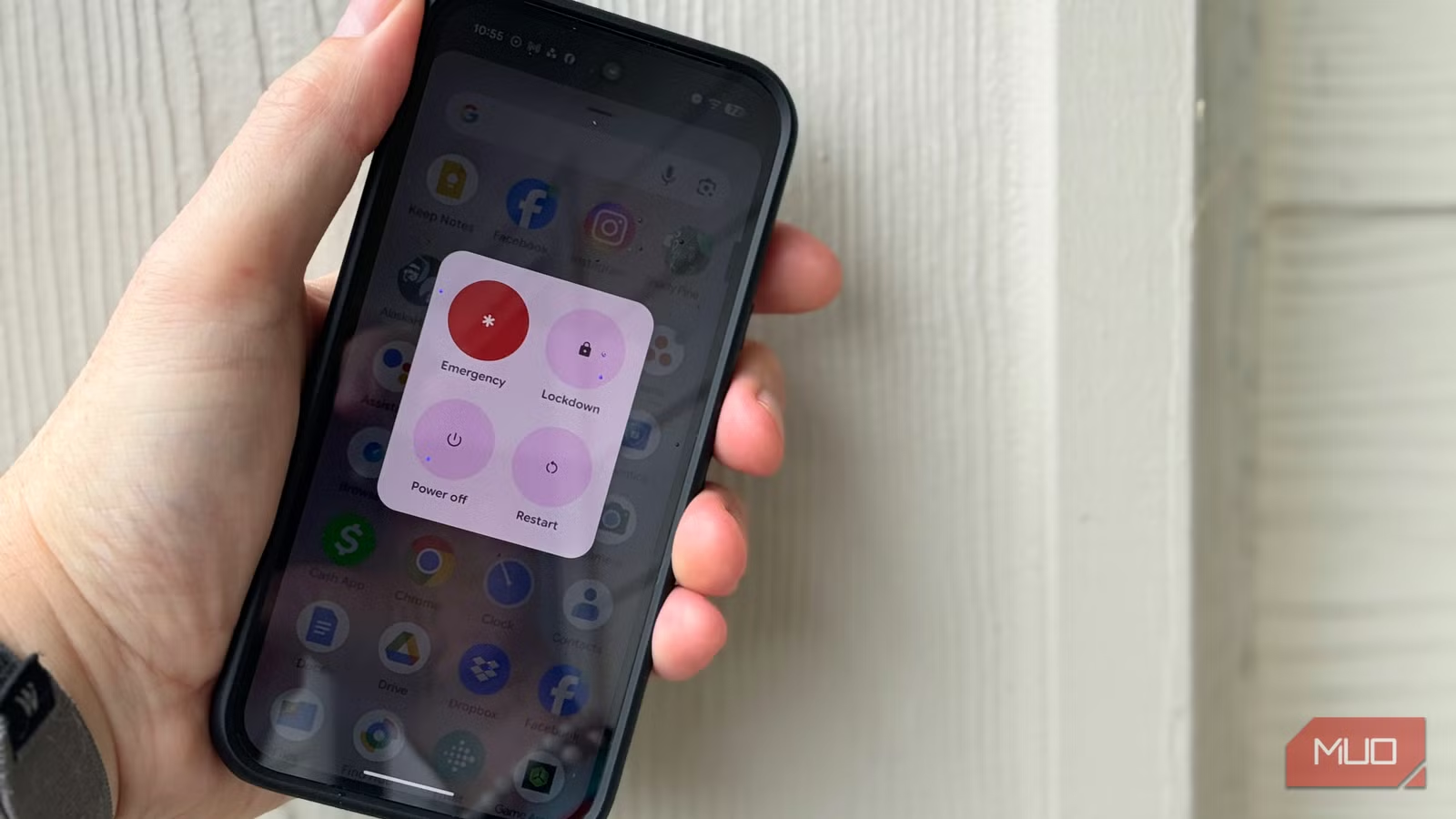
Unlocking your phone with your face or fingerprint is easy, useful, and fast, but it also makes it easier for others to access your phone. All they need to do is swipe your fingerprint real fast, or aim the phone at your face, and they’re in. Passcodes are much harder to force you to enter, and courts are much more willing to protect them under the Fifth Amendment.
Google’s stock Android phone, the Pixel, includes a feature called lockdown mode, and it’s a fantastic way to quickly and temporarily require a pass code to unlock it. I used it for a week to see how much of a hassle it is, and frankly, it’s become my favorite way to safeguard my info when I’m out and about. It’s something I wish my iPhone had going for it.
What lockdown mode actually does
It’s a single, focused fix
The fastest way to enable lockdown mode on a Google Pixel is by pressing the Volume up and Power buttons. Holding the power button down just pulls up Gemini, so be sure to use both buttons. The feature is available by default, so you don’t have to go searching through the Settings app to enable it. It disables all fingerprint and face unlock systems and forces you to use your pass code to unlock the phone. It also disables Extend Unlock/Smart Lock so that any of your trusted locations or Bluetooth devices won’t allow access to your phone, and it hides all lock screen notifications so content can’t be read without unlocking.
Lockdown mode resets automatically on the next unlock. Biometrics and lock screens all return to normal until you enable lockdown mode again. When you do lock it down, nohing is affected inside the phone — all your apps, data, Google Wallet, etc. will continue to work as usual.
Why your biometrics are a liability
The difference between a PIN and a fingerprint
None of the following is legal advice. If you need that, you’ll need to find a lawyer who specializes in this area.
That said, courts have generally held that a PIN is knowledge from the mind, called testimonial, and is therefore protected under the FIfth Amendment (which protects against self-incrimination). It’s not ironclad, though, as the 9th Circuit ruled that compelled fingerprint unlock is non-testimonial, while the D.C. CIrcuit ruled the opposite in 2025. Bottom line, you’re likely safer when using a PIN instead of a biometric unlock like fingerprints or face recognition.
If you’re crossing a border, CBP (Customs and Border Protection) has broad authority to search devices at the border without a warrant. Protest arrests are another time and place where your phone can be routinely searched and biometrics can be applied while you are physically restrained. You’ll definitely want to set your phone to lockdown at least if you attend a protest.

- SoC
-
Google Tensor G4
- Display
-
6.3-inch Actua pOLED display, 1080 x 2424 resolution, 60-120Hz, 3000 nits peak brightness
- RAM
-
8GB
- Storage
-
128GB, 256GB
- Battery
-
5,100 mAh
- Ports
-
USB-C
The Google Pixel 10a is a budget-oriented smartphone with a flat back and long battery life. It’s powered by the same Tensor G4 chip as its predecessor, and many key specs are identical to the Pixel 9a. However, you do get a brighter screen, better modem, new software features, and Android 16 with seven years of software support.
How Pixel’s lockdown mode compares to iOS
Apple has an emergency option, but it’s not the same thing

I rock an iPhone 15 Pro Max as my daily handset, and while I know you can turn off FaceID on iOS, that’s a fully nuclear option that, while useful, doesn’t have the same nuance as Pixel’s solution. My OnePlus Open doesn’t have a lockdown mode, either.
iOS has an Emergency SOS feature that you can activate by pressing the power button five times in a row. You’ll see a slider to Power off your iPhone, one to bring up your Medical ID, and one to activate an SOS Emergency Call. If you hit Cancel, your iPhone will require your pass code before going back to FaceID mode. Before you come at me, though, and say “this is the same thing as Pixel,” I’ll respectfully disagree. There’s nothing clear about the iOS solution, even if functionally it does similar. Lockdown on Pixel actually locks your phone immediately, no Cancel button needed.

Face ID Is Not Enough: The iPhone Password Protections You’re Probably Ignoring
Face ID can only get you so far.
What a week of daily lockdown mode actually felt like
The habit is easy to get back into

We all used to use PIN codes to get into our phones. Heck, when FaceID doesn’t work, thanks to sunglasses or weird lighting, you’ve got to put it in, anyway.
I put my Pixel into lockdown mode every night before bed, and again every time I left the house for a week.l The first couple of days took a little cognitive effort to remember to do it, but typing the PIN in to unlock was like revisiting an old friend. I was fully ok with it after day three; it just felt like the biometrics weren’t working and typing in the 6-digit number was seamless (fine, i forgot a couple of times, sheesh). The only friction was the Lock Screen Notification suppression, to be honest. I’ve come to rely on those to let me know what’s happening on my phone without having to open it up. Still, it’s a much stronger security feature, especially if I’m at a protest (I live in Portland, so that’s fairly often).
Doing it this way, instead of just turning off biometrics, made it feel more like a ritual, one more thing to do before events like protests or border crossings. It also lets you keep the biometrics on most of the time, because hopefully most of us aren’t under constant threat of hving our phones unlocked for evidence.
Is it worth it to turn on Lock Mode?
For me, the answer here is yes. Lockdown mode asks very little of me: a simple button press, tap, then unlock with a PIN. It’s easy to do and a little simpler than the five button press on my iPhone (which doesn’t lead to a clear press anyway). The protection it offers against compelled biometric access is real and unfortunately fairly relevant lately here in the U.S. at least. If you have a Pixel and travel or hit a protest or two, this is worth making a habit.