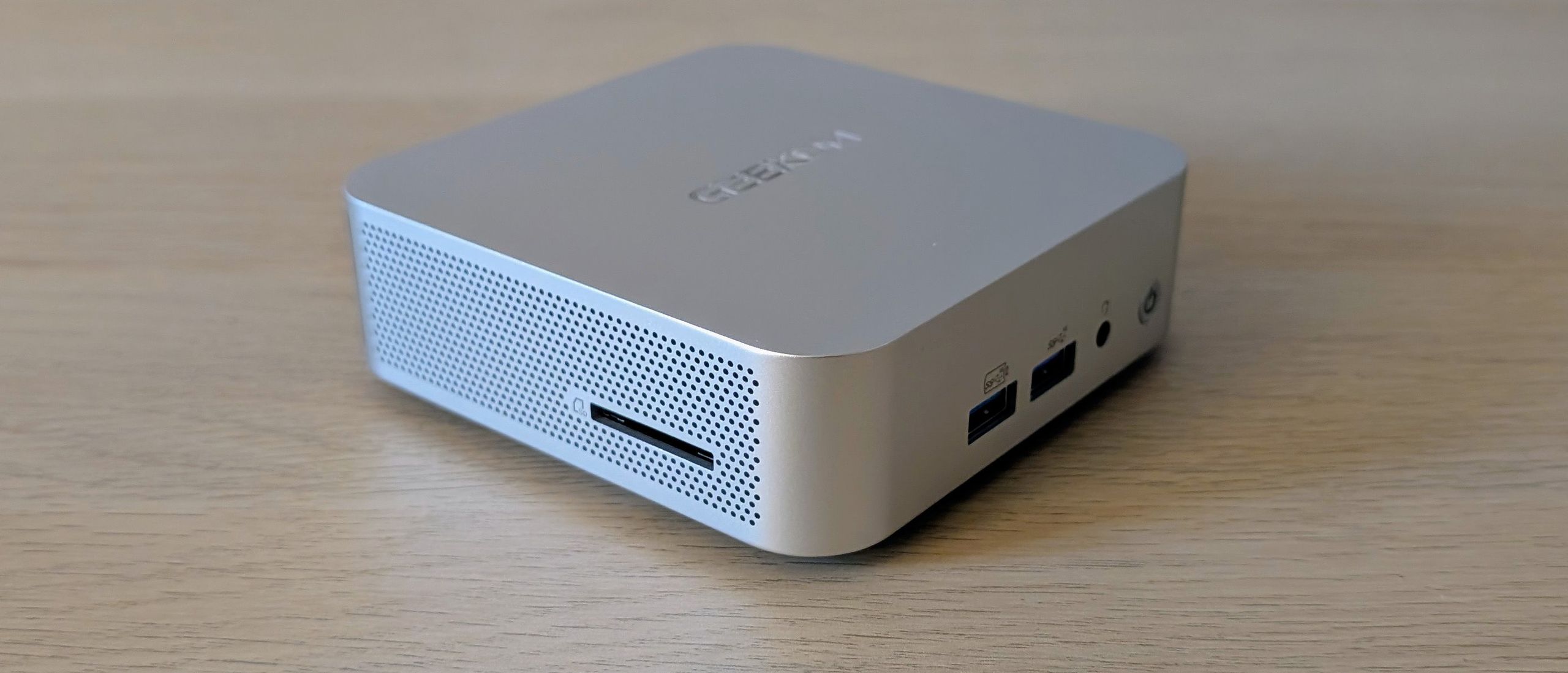
The Geekom A5 Pro is, in simple terms, a cheaper and pared-down version of the A8. By buying the A5 Pro, you will save around £150, depending on the offers Geekom has running on the two machines at the time.
At the time of writing, you can pick the A5 Pro up from Amazon for £424 and the A8 for £568, a saving of £144. You can also pick it up directly from Geekom in the UK and the USA, where the code ITPROA5PRO should get you a 7% discount. The Amazon USA sales page is here.
Image 1 of 6


Naturally, that saving means you are going to lose out on some of the A8’s features, so you have to make do with a 6-core 4.5Ghz AMD Ryzen 5 7530U CPU and basic Radeon graphics rather than an 8-core 4.9GHz Ryzen 7 8745HS CPU and Radeon 780M graphics.
You’ll also miss out on support for 6GHz Wi-Fi; the A5 Pro’s MediaTek RTL8852 wireless card only supports 2.4/5GHz signals. And the main SSD interface is PCIe 3.0 rather than 4.0, as in the A8. Other than that, the two machines are so difficult to tell apart that you’ll be forced to flip them over and see what’s written on the underside.
Geekom A5 Pro: Design
Externally, the A5 Pro is a dead ringer for the A8. They are the same size, same weight, give or take a few grammes, made from the same materials, and have the same physical array of ports. That means you are getting a smart, solid, and compact little metal box that’s easy to hide away or hook behind a monitor using the bundled VESA bracket. Other than said bracket, the only other accessory in the box is an HDMI cable.
Mirroring the A8, the front panel of the A5 Pro is home to the on/off button, two 10Gbps USB-A ports, and a 3.5mm audio jack. On the right side, you’ll find an SD card slot, while at the rear, there are two more USB-A ports, one 10Gbps, one 480Mbps, two 10Gbps Type-C ports, two HDMI 2.0 video outputs, and a 2.5GbE RJ45 jack.
While neither Type-C port is USB4-Compliant, both can output DisplayPort video. Neither can be used to power the system, though. For that, you must rely on the 65W rat-and-tail DC power supply. There’s nothing in the way of a Kensington lock, which is a bit of an oversight on a device that costs more than £400, is not much larger than a packer of cigarettes, and only weighs 375g.

(Image credit: Future)
Getting inside the A5 Pro involves prising the four rubber feet off the base, removing the four Philips screws beneath, removing the plastic base, and then removing the four more Philips screws and the metal shield plate.
There is a single antenna cable connecting the wireless card to the plastic base, but it’s long enough to give full access without having to disconnect it, unlike the A9 Max, A8 and A7 Max. Having to reconnect the wireless antennas in all three of those machines is a major pain in the backside, as we can testify firsthand.
Once you’ve removed the metal shield, you’ll find two SODIMM mounts and two SSD mounts, one occupied 2280 PCIe 3.0 (no surprise given that this is the best the chipset supports) and one unoccupied 2242 SATA3.
It’s worth recalling here that the A8 doesn’t have a second SSD slot, so when it comes to storing shedloads of data, the cheaper A5 Pro has a distinct advantage. The 1TB Wodposit SSD in our review unit delivered decent sequential read and write speeds of 3,131MB/s and 2,983MB/s, respectively. For a general-purpose box like the A5 Pro, that’s good enough, but the A8 can do significantly better here and in wireless data speeds thanks to its support for 6GHz Wi-Fi 6E.
Geekom A5 Pro: Specs and Performance
There’s only one version of the A5 Pro available, and it’s built around the 6-core, 12-thread AMD Ryzen 5 7530U CPU, a low-power processor launched back in early 2023. Graphics are provided by a Radeon (originally called the Radeon RX Vega 7) integrated GPU, a component with performance levels broadly similar to Intel’s basic mobile Integrated Graphics solution.
The A5 Pro ships with two 8GB RAM sticks, a preferred option compared to the single 16GB stick you get with the A7 Max. Granted, it means you end up with a spare stick if you want to add more, but in our view, that’s outweighed by the benefit of getting the performance boost from dual-channel RAM in the first place, especially with after-market RAM costing what it does at the moment.
Even a casual glance at the specification sheet shows that the AMD chipset in the A5 Pro is no stump-pulling powerhouse, and testing bore this out. In the GeekBench 6 CPU test, it scored 1,977 and 6,859 in the single and multi-core test, while in ITPro’s bespoke Handbrake-based 4K multi-media test, it scored 178.

(Image credit: Future)
We’ve got a 2020 vintage M1 MacBook Air lying about the office that returns very similar scores. For a more relevant comparison, the A8 scored 2,568 and 12,842 in the GeekBench test and 363 in the 4K multimedia. Clearly, there is a world of difference in CPU performance between the two Geekom boxes, even when allowance is made for the fact that the A8 had 32GB of RAM in it.
The same is true when it comes to graphics. The new A5 Pro scored 15,059 in the GeekBench 6 OpenCL test to the A8’s 30,455, and in a more practical test, the A5 Pro ran the SPECviewperf 3dsmax 3D modelling benchmark at 15fps, to the A8’s 40fps.
It’s fair to say that in all meaningful ways, the A8 is twice as powerful as the A5 Pro. If all you need is a box for light productivity and media serving, the A5 Pro is a good alternative, but if you want something for demanding work, intense graphics jobs, and light gaming, the A8 is most certainly worth the extra money.
Neither the A8 nor the A5 Pro has anything in the way of an NPU, the former because the chipset was originally a China-only component and they have rules about such things, the latter because its chipset predates the AI fad. This means there’s no support for Windows’ CoPilot AI features like Recall or generative fill in Paint.
If you want those features, you’ll need to look at something like the Geekom A9 Max or the MSI Cubi NUC AI+ 2MG, both of which are built around more modern chipsets with 50 TOPS (well, 47 in the case of the Intel-powered MSI) NPUs.
The low-power chipset doesn’t cause any problems for the A5 Pro’s single fan. Even under maximum stress, both the CPU and GPU run continuously at 100% utilization, with the fan making little more than a low whisper.
The A5 Pro is only available with Windows 11 Pro preloaded. Still, Geekom advises that it will work with Ubuntu and Fedora, and it proved true: both Ubuntu 24.04 LTS and Fedora 43 ran perfectly out of the box.
Geekom A5 Pro: Is it worth it?
At the risk of stating the blindingly obvious, whether you should choose the A5 Pro or A8 AI depends entirely on what you plan on using your mini PC for.
The A5 Pro’s natural habitat is basic productivity and media serving, jobs that won’t tax the rather gutless chipset but will take full advantage of the facility to add a second, albeit SATA3, SSD.
For anything more demanding, especially on the graphics front, the A8 is a better choice. If you want a box to run programmes like Adobe Photoshop or other GPU-intensive apps, the Radeon 780M is by far the better option.
Geekom A5 Pro Specifications
|
Processor |
AMD Ryzen 5 7530U |
Row 0 – Cell 2 |
|
GPU |
AMD Radeon |
Row 1 – Cell 2 |
|
RAM |
16GB DDR4 |
Row 2 – Cell 2 |
|
Ports |
USB-C 3.2 Gen 2 x 2, USB-A 3.2 Gen 2 x 3, USB-A 2.0 x 1, 2.5G RJ-45 x 2, HDMI 2.0 x 2, 3.5mm audio x 1, SD card reader |
Row 3 – Cell 2 |
|
Storage |
1TB SSD |
Row 4 – Cell 2 |
|
Connectivity |
Wi-Fi 6, Bluetooth 5.2 |
Row 5 – Cell 2 |
|
Weight |
375g |
Row 6 – Cell 2 |
|
Dimensions (WDH) |
112 × 112 × 38mm |
Row 7 – Cell 2 |
|
Operating system |
Windows 11 Pro |
Row 8 – Cell 2 |